
Manage plan & billing
View your current plan, seat count, and billing details, or upgrade your plan from Organization Settings.
Before you start
You must be an org admin or billing contact to access Manage Plan & Billing.
View or change your plan
- Click into your organization, then click the ⚙ icon next to your organization's name, or click your initials icon in the top right.
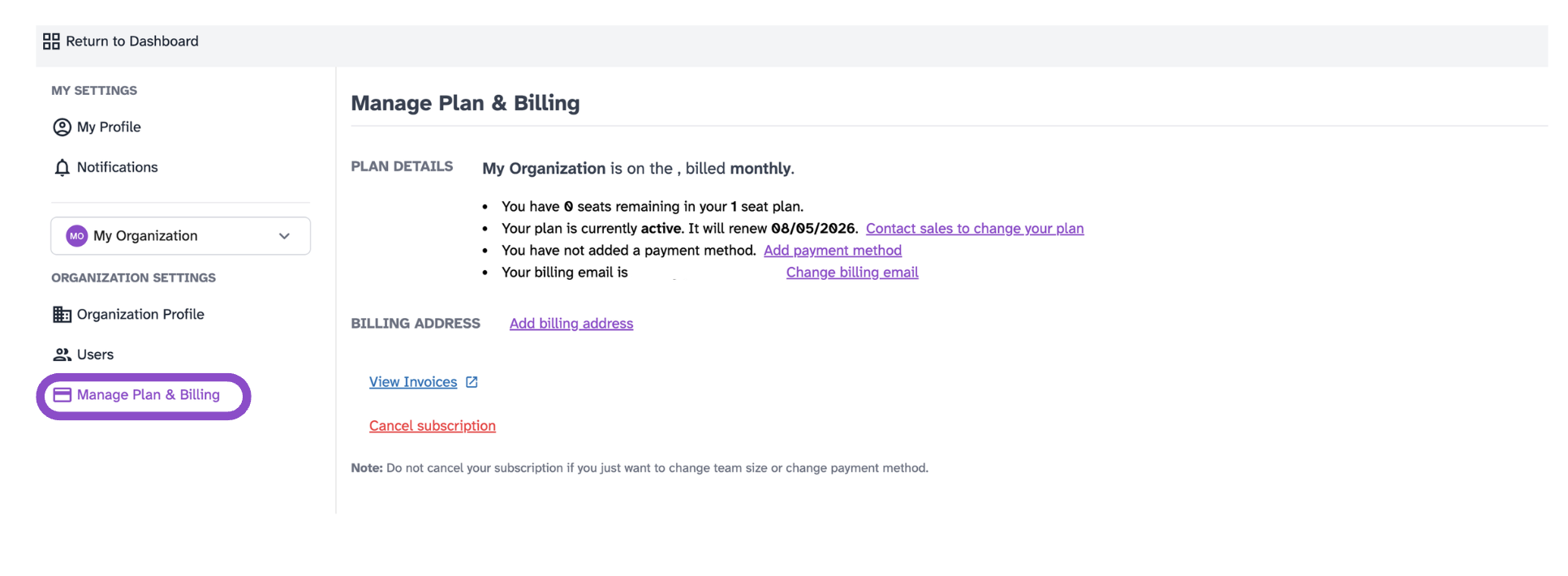
- Click Manage Plan & Billing under Organization Settings.
- Review your current plan, seat count, and billing details.
- Follow the on-screen options to upgrade or change your plan.
Plan actions
Plan Details shows your current plan, seat count, renewal date, and billing email. From here you can:
- Click Contact sales to change your plan to upgrade or modify your plan.
- Click Add payment method to add a card on file.
- Click Change billing email to update where billing emails are sent.
- Billing Address: Click Add billing address to add or update your billing address.
- View Invoices:Opens your invoice history in a new tab.
- Cancel subscription: Cancels your subscription. See the tip below before using this.
Tips and edge cases
- Do not cancel your subscription if you only want to change your team size or update your payment method, use the options above instead.
- If Manage Plan & Billing is not visible, you may not have admin access.